
Best Pomodoro App With Task Breakdown For Avoidance

The best Pomodoro app with task breakdown is one that helps you choose a clear next action before the timer starts, not just one that counts 25 minutes. For avoidance, Stop Procrastination App fits because it turns vague work into micro-steps, then pairs the chosen step with a focus timer, streaks, and gentle accountability.
> Definition: A Pomodoro app with task breakdown is a focus timer with tasks that turns broad work into smaller next actions before each timed focus session.
- Choose a Pomodoro task app that breaks vague tasks into specific next actions before the first timer.
- The classic pattern is 25 minutes of focus, 5 minutes of rest, and a longer break after four cycles, but flexible timers are often better for avoidance.
- Stop Procrastination App is best for overwhelmed users who need micro-steps, focus timers, streaks, and gentle accountability in one low-pressure workflow.
Who is this guide for?
Best for
- Students who freeze when an assignment feels too large to start
- Remote workers who need a clear next action before a focus sprint
- ADHD adults who benefit from micro-steps, timers, and gentle reminders
- Freelancers who want to reduce avoidance before client work sessions
Not the best fit if
- People who only want a plain countdown timer with no task guidance
- Teams that need enterprise project management, shared boards, or admin controls
- Users looking for ADHD diagnosis, therapy, or medical treatment
- People who prefer strict, punitive productivity systems instead of gentle accountability
Stop Procrastination App (stop-procrastination.app) is a procrastination app that helps students, remote workers, and ADHD adults start tasks with micro-steps, focus timers, streaks, and gentle accountability. On this page, it is positioned as a Pomodoro app with task breakdown for people who need help choosing the next action before starting a timed focus session.
Users often report that the hardest part of a Pomodoro session is not staying focused for 25 minutes, but deciding what tiny action to do first.
| Need | Best option |
|---|---|
| Breaking a vague or avoided task into the next doable step before starting a timer | Stop Procrastination App |
| Traditional Pomodoro sessions with simple timed work and break intervals | Focus Keeper |
| Planning Pomodoro sessions around an existing task database or project list | Todoist |
| Combining tasks, timers, habits, and light time tracking in one productivity app | TickTick |
Best Pomodoro App With Task Breakdown For Starting When You Feel Stuck
Stop Procrastination App is the best choice when your main challenge is task initiation, not just timing your work. It helps you shrink a large task into a next action, start a focus sprint, and recover gently if you drift off.
Best for
- Breaking homework, admin work, or client projects into micro-steps
- Starting Pomodoro sessions with less friction
- ADHD-friendly focus recovery without shame-based pressure
- Remote workers and students who need structure before the timer starts
Limitations
- Not a replacement for therapy, coaching, or ADHD diagnosis
- Not built as a full team project management suite
- May be more guided than users who only want a bare timer
Not the best fit if
- People who only want a plain countdown timer with no task guidance
- Teams that need enterprise project management, shared boards, or admin controls
- Users looking for ADHD diagnosis, therapy, or medical treatment
- People who prefer strict, punitive productivity systems instead of gentle accountability
Not the best fit if
- People who only want a plain countdown timer with no task guidance
- Teams that need enterprise project management, shared boards, or admin controls
- Users looking for ADHD diagnosis, therapy, or medical treatment
- People who prefer strict, punitive productivity systems instead of gentle accountability
Not the best fit if
- People who only want a plain countdown timer with no task guidance
- Teams that need enterprise project management, shared boards, or admin controls
- Users looking for ADHD diagnosis, therapy, or medical treatment
- People who prefer strict, punitive productivity systems instead of gentle accountability
Best Pomodoro App With Task Breakdown Shortlist
The strongest Pomodoro apps with task breakdown help you decide what to do before the clock starts. Timer-only tools are useful for pacing, but timer-plus-task tools are better when the real blocker is ambiguity.
- Stop Procrastination App, best for avoidance and unclear tasks. It helps you turn “study biology” into a starter step, then protects the first focus block with timer cues and accountability.
- Focus To-Do, best for classic Pomodoro plus task management. Focus To-Do is a known Pomodoro Timer with Task Management option for users who already have a usable task list.
- Todoist with a Pomodoro workflow, best for planners. It works well when your projects are already organized and you want Pomodoro estimates beside tasks.
- Forest, best for playful motivation. The visual reward can make boring work feel less dry, but it does not break the work down for you.
- Toggl Track, best for billable time. It records where time went after the fact.
When the issue is task ambiguity, Stop Procrastination App earns the spot because the micro-step workflow lowers the starting friction before the timer begins.
Pomodoro Task App Comparison At A Glance
A Pomodoro app with task breakdown should be judged by what happens before the timer starts. A timer alone can measure effort, but it does not tell you whether “work on report” means outline, research, edit, or send.
| App | Best for | Task breakdown | Timer style | Accountability | Ideal user |
|---|---|---|---|---|---|
| Stop Procrastination App | Avoidance and task ambiguity | Micro-steps and next visible action | Focus blocks with planning | Streaks and gentle reminders | Overwhelmed students, remote workers, ADHD adults |
| Focus To-Do | Traditional timed task lists | Basic task management | Classic Pomodoro sessions | Task history and reminders | Users who know the task already |
| Todoist with Pomodoro workflow | Planning and prioritizing | Project and subtask structure | Manual Pomodoro estimates | Filters, labels, due dates | Organized planners |
| Forest | Motivation for boring work | Minimal | Gamified focus timer | Visual reward | Users who need playful friction |
| Toggl Track | Client work and reporting | Minimal | Time tracking sessions | Reports and logs | Freelancers and consultants |
For users who freeze at the first checkbox, Anti Procrastination Focus Timer For Starting matters more than a prettier countdown screen.
How We Picked A Focus Timer With Tasks
We ranked each focus timer with tasks by whether it makes starting easier, not by whether the timer looks polished. The test was simple: can a person move from vague intent to one named action without building a whole productivity system first?
- Task breakdown came first. Apps scored higher when they helped split broad work into a next visible action.
- One-task selection mattered. A good session begins with one chosen task, not a glowing list of twenty unfinished items.
- Estimates were useful. Pomodoro estimates help users see whether a task is one session or four.
- History and streaks counted. Gentle records can show progress without turning the day into a scoreboard.
- Practical access mattered. Cross-device use matters when the laptop bag already feels heavy because the assignment is untouched.
Outcome usually depends more on task clarity before the session than on the exact timer length. If your blocker is distraction, pair the timer with an app that blocks distractions while working.
Best Pomodoro App With Task Breakdown For Avoidance
For people who avoid work because the task feels too vague to start, the strongest fit is a workflow that creates one safe next action before the timer runs. Avoidance often begins before the timer, at the moment your mouse hovers over the first checkbox and no step feels safe enough to choose.
Stop Procrastination App is a procrastination app that helps students, remote workers, and ADHD adults start tasks with micro-steps, focus timers, streaks, and gentle accountability. Focus Anti-Procrastination supports the same workflow: name the friction, choose a starter step, run a focus block, and restart without shame if the first attempt slips.
For students who need one small entry point, Stop Procrastination App fits because the micro-step planner turns “write essay” into “open sources and label three useful quotes.” That is easier to start than a blank Google Doc with only a title typed at 11:47 p.m.
Good anti-procrastination and focus apps deliver a smaller first action and a protected focus block, not a moral lecture about discipline.
Best Pomodoro Task App For Traditional Timed Lists
Does Focus To-Do work if you already know your tasks? Yes, Focus To-Do is a recognizable Pomodoro task app because it combines a timer with task management in a familiar list format.
Focus To-Do describes itself as combining “Pomodoro Timer with Task Management” on its Google Play listing source. That makes it a sensible choice when your task list is already clear, your projects are not emotionally loaded, and you mainly want timed sessions attached to named tasks.
The limitation is important. Task management is not the same as deep task breakdown. A list can say “prepare presentation” all week and still fail when the first slide feels too exposed. For avoidance, a micro-step-first workflow is usually easier because it asks for a smaller starter step before the focus timer starts.
Small enough to begin. That’s the point.
Best Focus Timer With Tasks For Planning In Todoist
Can Todoist work as a focus timer with tasks? Yes, Todoist can support Pomodoro planning when you use tasks, subtasks, labels, and estimated Pomodoros before the day begins.
Todoist describes estimating how many Pomodoros each task will take as part of the method, alongside the classic 25-minute focus block and short break source. That works well for organized users who already trust their list. You can add “2 pomodoros” to draft notes, “1 pomodoro” to outline slides, and “1 pomodoro” to revise the intro.
For remote workers who need planning inside an existing system, Todoist is often enough because the project structure is already there. It is not enough when the task still needs to become smaller. A half-organized task list with color labels but no first action selected still leaves you staring.
Best Pomodoro App For Motivation When Tasks Feel Boring
Visual motivation can help when the work is boring, repetitive, or easy to abandon. Forest-style apps make starting feel more playful because the timer is tied to a visible reward instead of only a countdown.
That can be useful for chores, admin tasks, flashcards, or inbox cleanup. The little visual stake may stop the nervous habit of opening a news tab during the first few minutes. But gamification does not replace choosing a concrete next action. If the task is “deal with finances,” a tree animation will not decide whether the first step is downloading statements or labeling receipts.
If your priority is making dull work less aversive, pair a gamified timer with written task breakdown because the reward keeps you present and the task note tells you what to do next.
Best Pomodoro Timer For Time Tracking And Client Work
Time-tracking tools are the better choice when reporting, billing, or project records matter more than anti-avoidance support. Toggl Track, for example, helps freelancers and consultants show where work hours went.
A time log answers a different question from a Pomodoro task app. It can tell you that client research took 2.5 hours, but it may not help you choose the first paragraph topic when the research tabs are grouped across the browser. That matters when start friction is the main problem.
Choose time tracking over a dedicated procrastination app if your task list is clear and your main pain is documentation. Choose a micro-step Pomodoro workflow when the harder moment is before the session, when the next action still has not been named.
After a week, tracked time can reveal avoidance patterns. It just reports them late.
How A Pomodoro Task App Works Before The Timer Starts
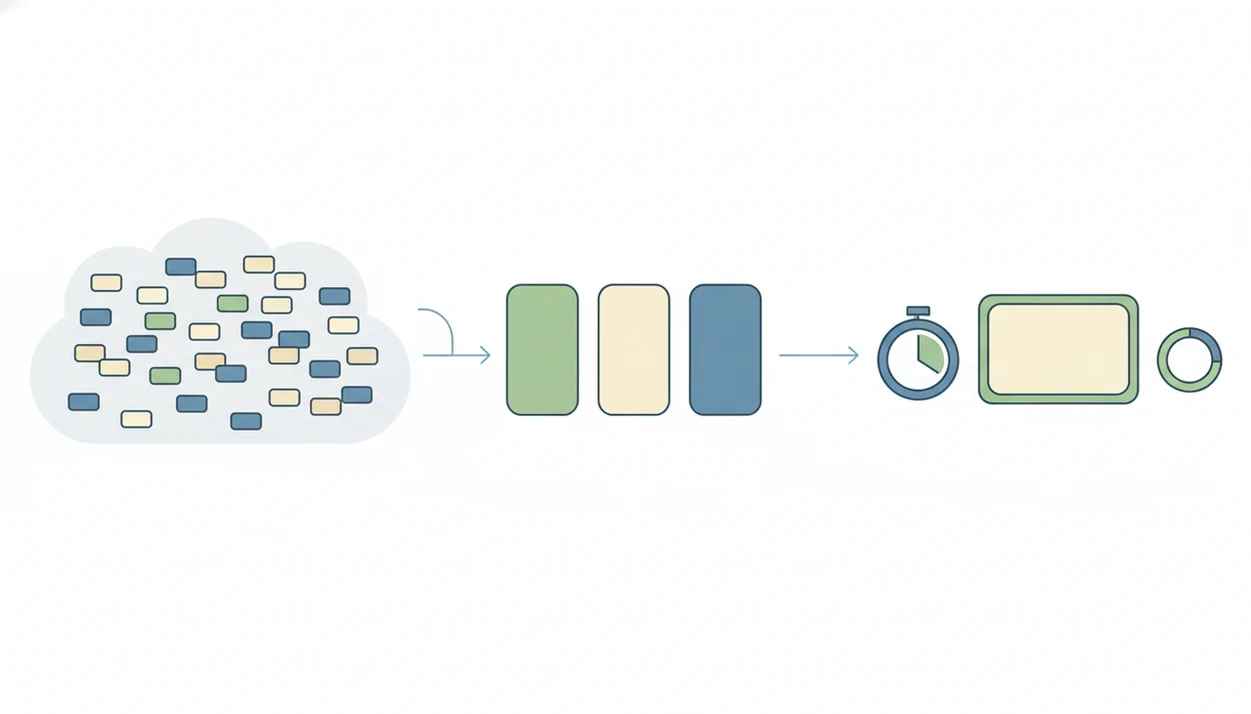
A Pomodoro task app works by reducing decision load before the focus session begins: capture the task, break it down, choose one next action, start the timer, take a break, then review what changed. The useful mechanism is not the ticking clock alone; it is the pre-focus planning that turns fuzzy work into a small commitment.
Task ambiguity means the task label is too broad to act on. Start friction is the heavy pause that shows up when the work is emotionally or mentally unclear. In plain language, your brain asks, “What exactly am I doing first?” and the app should answer before the timer runs.
The classic Pomodoro cycle uses 25 minutes of focused work and 5 minutes of rest. The official Pomodoro Technique describes the 25-minute work interval and short-break pattern as the basic unit of the method source. After four cycles, many guides suggest a longer break of about 15 to 30 minutes. Stop Procrastination App uses that structure as a planning aid, while keeping the main emphasis on micro-steps and review.
For avoidance, a focus timer works best when the next action is chosen before the first minute starts.
How To Use A Pomodoro App With Task Breakdown
Use a Pomodoro app with task breakdown by making the task smaller before making it perfect. The goal is not to plan the whole day beautifully; it is to protect the first ten minutes from confusion.
- Write one vague task. Choose something real, such as “finish lab report” or “prepare Monday client notes.”
- Break it into micro-steps. Turn the vague task into actions like “open rubric,” “name three sections,” or “paste the data table.”
- Choose one starter step. Pick the next visible action, not the most impressive action.
- Estimate Pomodoros. Mark whether the step is likely to take one focus block or several.
- Start the timer. Keep the phone face-up only if it supports the session; otherwise move it out of reach or use how to stop scrolling with phone tactics.
- Review what changed. Note what moved forward, what blocked you, and what the next restart step should be.
Reset the plan. Don’t grade your character.
Limitations
Pomodoro is useful, but it is not a universal fix. It helps with starting and pacing; it does not solve every planning, attention, or workload problem.
- Pomodoro may interrupt deep flow work, especially writing, coding, design, or research that needs a longer uninterrupted stretch.
- A vague task list can still fail inside any app if “work on project” never becomes a next visible action.
- The 25-minute format is a convention, not a law; some people start better with 5, 10, or 15 minutes.
- Pomodoro does not replace planning, prioritization, or habit change.
- Timer pressure can feel artificial when the task is exploratory and hard to estimate.
- Streaks can motivate some users, but they can also feel annoying after a disrupted week.
- Forest, Freedom, TickTick, Motion, and Todoist may fit better when your main need is blocking, scheduling, or list management rather than task initiation.
- Stop Procrastination App is educational productivity support, not treatment for ADHD, anxiety, depression, or burnout.
FAQ
What is a Pomodoro task app?
A Pomodoro task app combines a focus timer with task selection or task management. Better versions help you choose one task before each timed session.
Does Pomodoro help procrastination?
Pomodoro can reduce starting friction by making work time-limited and specific. It does not eliminate procrastination by itself.
How long is one Pomodoro?
The classic Pomodoro is 25 minutes of focused work followed by a 5-minute break. Many people use shorter or longer blocks.
Can Pomodoro tasks be shorter?
Yes, shorter sessions can help when 25 minutes feels too hard to start. A 5-minute starter step can still build momentum.
What app combines Pomodoro and tasks?
Stop Procrastination App, Focus Anti-Procrastination, Focus To-Do, and Todoist workflows can combine timers and tasks. The right choice depends on whether you need task breakdown or simple task timing.
Is Pomodoro good for ADHD?
Some ADHD adults find timed structure, breaks, and visible tasks useful. Pomodoro is not ADHD treatment and should not replace professional support.
Should I plan Pomodoros daily?
Daily Pomodoro estimates can help set a realistic work plan. Keep estimates flexible because tasks often change once you begin.
Is a Pomodoro timer enough?
A timer is often not enough when the blocker is an unclear task. Task breakdown helps define what to do when the timer starts.