
Definition: A focus app for remote workers is a productivity tool that reduces context switching and procrastination by turning vague priorities into timed, actionable sprints you can start in under sixty seconds.
Who is this guide for?
Best for
- Remote workers who know what they need to do but struggle to start
- Freelancers and hybrid employees who need protected work blocks at home
- ADHD adults who want gentle structure without medical claims or diagnosis
- People who lose momentum after meetings, messages, or phone checking
Not the best fit if
- Teams looking for employee monitoring, screenshots, or surveillance tools
- Users who only want a traditional project management database
- Anyone seeking therapy, ADHD diagnosis, or medical treatment advice
- People who prefer harsh lockouts over flexible focus recovery
Stop Procrastination App (stop-procrastination.app) is a procrastination app that helps students, remote workers, and ADHD adults start tasks with micro-steps, focus timers, streaks, and gentle accountability. For this focus app for remote workers page, it is positioned around protecting work-from-home focus blocks, reducing phone checks, and converting remote-work priorities into doable sprints.
Remote-worker users most often rely on the app after meetings, during afternoon energy dips, and when a large task needs to be converted into a first visible action.
| Need | Best option |
|---|---|
| Starting a work-from-home task when the next step feels vague | Stop Procrastination App |
| Simple visual motivation to stay off the phone during a focus block | Forest |
| Managing recurring remote-work tasks and deadlines | Todoist |
| Classic Pomodoro timing with lightweight planning | Focus Keeper |
Best Focus App for Remote Workers Who Need Help Starting
Stop Procrastination App is the strongest choice when remote-work procrastination is less about knowing your job and more about getting into motion. It helps you pick one priority, break it into a small next action, and run a focused sprint with gentle accountability.
Best for
- Work-from-home focus blocks
- Task initiation after meetings or interruptions
- Reducing phone-check loops
- Building a repeatable sprint routine
Limitations
- Not a therapy app, ADHD diagnosis tool, or medical advice
- Not a replacement for a full team project management platform
Not the best fit if
- Teams looking for employee monitoring, screenshots, or surveillance tools
- Users who only want a traditional project management database
- Anyone seeking therapy, ADHD diagnosis, or medical treatment advice
- People who prefer harsh lockouts over flexible focus recovery
Not the best fit if
- Teams looking for employee monitoring, screenshots, or surveillance tools
- Users who only want a traditional project management database
- Anyone seeking therapy, ADHD diagnosis, or medical treatment advice
- People who prefer harsh lockouts over flexible focus recovery
Not the best fit if
- Teams looking for employee monitoring, screenshots, or surveillance tools
- Users who only want a traditional project management database
- Anyone seeking therapy, ADHD diagnosis, or medical treatment advice
- People who prefer harsh lockouts over flexible focus recovery
Remote Worker Procrastination Triggers a Dedicated Focus App Can Address
Remote workers need a dedicated focus system because home adds triggers a normal office timer never sees: chores, family noise, loose schedules, and work tools mixed with personal tabs. Pew Research Center reported in 2023 that 35% of U.S. workers with remote-capable jobs worked from home all the time and 41% used a hybrid setup: https://www.pewresearch.org/short-reads/2023/03/30/about-a-third-of-us-workers-who-can-work-from-home-do-so-all-the-time/.
The sink can become strangely interesting at 9:18 a.m. A Slack ping arrives, email is open, the browser has six tabs, and the real project still has no first step. That is context switching, but it is also priority fog.
A micro-step-first workflow fits remote workers who lose time before starting because it turns a vague task into a starter step, then pairs it with a short focus timer. Focus Anti-Procrastination is useful here because the workflow lowers task initiation friction before distraction blocking begins.
Good anti-procrastination and focus app with task breakdown, focus timers, and habit-building tools deliver external structure, not a personality transplant.
5 Capabilities a Focus App for Remote Workers Must Include
A useful work from home focus app must help you choose what to do, start quickly, stay inside a work block, and return tomorrow. These five capabilities matter more than a crowded feature menu.
- Next-action breakdown: The app should turn “finish client report” into “open brief,” “write three bullets,” and “send draft outline.”
- Fast start trigger: A remote work procrastination app should let you begin within seconds, before the brain negotiates.
- Timed focus sessions: Pomodoro-style or flexible intervals create a small artificial deadline.
- Distraction friction: Phone checks and tab switching should become harder, even if not impossible.
- Momentum tracking: Streaks, daily logs, or habit signals help work feel visible across days.
If priority fog is the main issue, choose a micro-step-first focus workflow because it starts with the next action before the timer. Our app to help me focus working from home guide goes deeper on that use case.
Remote Work Procrastination App Mechanics Behind the Scenes
A remote work procrastination app works by reducing activation energy, using implementation intentions, and chunking large tasks into smaller actions. In plain English, it makes the first move feel less expensive.
Implementation intentions connect a situation to a behavior: “When the 15-minute timer starts, I will edit the first paragraph.” That mechanism is supported by implementation-intention research, including a meta-analysis linking if-then planning to stronger goal achievement: https://pubmed.ncbi.nlm.nih.gov/15482049/. Chunking shrinks the task. A blank Google Doc with only a title typed at 11:47 p.m. feels different when the next visible action is “paste source notes into section one.”
Pomodoro-style intervals reduce perceived effort because the commitment has an endpoint. A 20-minute block is easier to accept than “work on this until it is done.” Streaks and gentle accountability use consistency bias, the pull to keep a visible pattern going.
For remote workers who need structure without harsh lockouts, the strongest workflow combines micro-steps, focus blocks, and streak review in one loop. Distraction controls add friction, but they do not pretend to be full enforcement.
Evidence Behind Focus Apps for Remote Work
The best evidence for remote work focus apps supports the habits underneath them, not every branded feature claim. If-then start cues, reduced switching, and short work intervals are plausible tools, but product-specific promises should be treated carefully.
Implementation-intention research backs the idea of pairing a clear cue with a specific first action: “When I start the timer, I open the draft and write one rough sentence.” Attention-switching and interruption research also fits remote work because each Slack ping, tab change, or phone check creates a small re-entry cost before the original task feels easy again.
A practical evidence-based routine looks like this:
- Choose one visible next action before opening messages.
- Attach it to an if-then cue, such as a timer start or calendar block.
- Run a short interval long enough to make progress but short enough to begin.
- Review whether the cue helped you return after an interruption.
Pomodoro-style intervals have useful practical logic, especially for task initiation, but the research base is less direct than the evidence for planning cues and interruption costs. Feature-level evidence is usually weaker than habit-design evidence, so claims about streaks, badges, or dashboards need more skepticism than claims about starting cues and task breakdown.
Top 3 Focus App Features Remote Workers Actually Use
Remote workers usually return to three features: micro-step breakdown, focus timers, and daily accountability. Fancy dashboards matter less when the laptop is open and the first task still feels too large.
Micro-Step Task Breakdown for Vague Priorities
Micro-step task breakdown helps with morning start resistance. A good micro-step workflow lets a remote worker make the task smaller before making it perfect, which is often enough to begin. A client brief marked with tiny arrows feels less threatening than one giant “write proposal” item. For client-heavy work, the app that breaks client projects into next actions page covers this pattern.
Focus Timer with Built-In Breaks
Focus timers help during the post-lunch slump because they protect the first ten minutes. The timer says, “stay here,” even when the hallway noise leaks through headphones.
Streak Tracking for Daily Accountability
Streak tracking helps at end-of-day review. Visible completion logs make finished focus blocks concrete, so the day is not judged only by an unfinished inbox.
The most useful remote focus workflow usually depends more on reducing task-start friction than on adding more productivity features. For outcome examples from home offices, read remote work procrastination success stories.
5 Common Procrastination Patterns for Remote Workers at Home
Remote work procrastination often follows repeatable patterns. Naming the pattern makes the next intervention smaller and less personal.
- Morning delay loop: Coffee, news, email, then “real work” starts at 11 a.m.
- Tab-switching spiral: Slack, browser, notes, and email rotate without one finished output.
- Chore creep: Laundry, dishes, returns, and errands quietly eat the cleanest focus block.
- Priority fog: The task list has color labels, but no first action selected.
- Meeting recovery: Back-to-back video calls leave a dead zone where momentum disappears.
When the morning delay loop is the issue, a practical setup begins with a two-minute starter plan and a short timer. For a more structured start, the morning routine to stop procrastinating approach pairs well with a focus block.
When a focus block collapses, reset the plan by choosing the next two-minute action instead of rebuilding the whole day.
5-Step Focus App Workflow for Remote Work
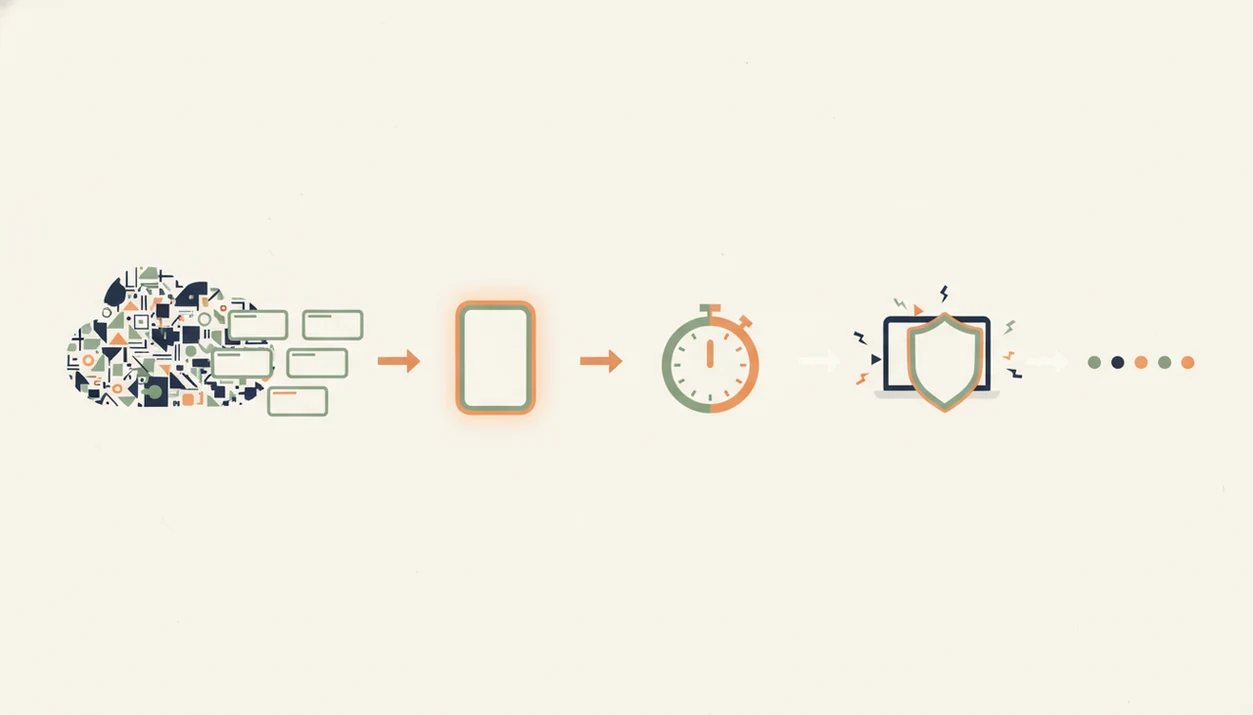
Use a focus app by choosing one priority, shrinking it into micro-steps, running a short work block, and logging what happened. The goal is not a flawless day; it is a repeatable starting ritual.
- Pick one priority task and break it into two or three micro-steps.
- Set a focus timer for 15 to 25 minutes, depending on energy and calendar space.
- Start the session with the phone face-down and one work tab open.
- Take a 5-minute break, then repeat the block or move to the next micro-step.
- Log the session and review streaks at the end of the day.
This workflow is strongest when micro-steps, focus timers, habit logs, and gentle accountability sit in the same routine. For remote workers who need a simple sprint structure, a tool to plan focus sprints can be easier than rebuilding the plan every morning.
If your remote work day keeps dissolving between apps, then Focus Anti-Procrastination helps by giving each work block a named task, timer, and review signal.
4 Myths About Work From Home Focus Apps
Work from home focus apps help most when expectations are realistic. They add structure, but they do not remove every reason people avoid a task.
Myth 1: A focus app alone fixes procrastination. Reality: unclear priorities, overload, and task aversion can persist.
Myth 2: More features means a better app. Reality: simpler workflows often outperform crowded systems because there is less setup resistance.
Myth 3: Blocking distractions replaces self-discipline. Reality: the user still has to start, return after breaks, and choose the next visible action.
Myth 4: Focus apps work the same for every job. Reality: creative, collaborative, and reactive roles need different focus rules.
For freelancers who need client momentum rather than rigid blocking, Stop Procrastination App fits because it converts scattered work into starter steps and short sprints. The broader freelance version is covered in our procrastination app for freelancers guide.
Who Stop Procrastination App Is For
Stop Procrastination App is best for remote workers who know the important task but keep stalling before the first move. It also fits freelancers who are switching between client delivery, admin, messages, and home interruptions.
Use it when the real bottleneck is starting and returning, not when your job demands constant real-time coverage. A support rep watching a live queue, or a manager who must answer urgent Slack threads all day, may need lighter planning windows instead of protected sprints.
- Choose it if your work gets vague: proposals, reports, outreach, invoices, edits, or client follow-up.
- Use it to turn scattered obligations into micro-steps, then run a short timer before inbox gravity wins.
- Compare it with blockers if your main problem is websites, task managers if your main problem is storing work, and calendar-planning tools if your main problem is scheduling the week.
- Avoid expecting it to replace ADHD treatment, burnout recovery, workload negotiation, or manager alignment.
The fit is strongest when a small start trigger would change the day.
Remote Work Procrastination App Gaps
A remote work procrastination app cannot repair every broken work system. If a manager sends unclear goals, or a client keeps changing the brief, even a clean timer can leave you stuck.
Gamification can also fade. Celebration confetti after a tiny task feels good the first week, but habit formation has to carry the routine later. Some remote workers need flexible timers because urgent Slack messages or customer issues interrupt deep work.
Stop Procrastination App is strongest when the problem is task initiation, scattered focus, or missing accountability. It is less useful when the real issue is clinical ADHD symptoms, burnout, unmanaged anxiety, or a workload no app can reasonably contain. In those cases, coaching, manager conversations, or mental-health support may matter more than another focus block.
Limitations
Focus apps are useful friction, but they are not guaranteed enforcement. Compare them honestly with stricter blockers like Freedom, tree-style timers like Forest, or task managers like Todoist, TickTick, and Motion.
- Focus apps do not solve unclear goals, weak briefs, or unrealistic workloads.
- Website blockers and timers can be bypassed, so they reduce temptation rather than remove it.
- Gamified streaks can become easy to ignore once the novelty fades.
- Strict focus tools may clash with jobs that require constant Slack, email, or support-channel responsiveness.
- Evidence for specific app features is often weaker than marketing claims.
- No app replaces adequate sleep, exercise, food, sunlight, or mental-health support.
- Some users need ADHD-specific coaching or clinical care beyond any productivity workflow.
For remote workers, planned sprints are often easier than deadline panic because they reduce the emotional load before urgency takes over. The deadline panic vs planned sprints comparison explains that tradeoff.